Artificial intelligence (AI) has completely changed how YouTube videos are created. In 2026, you no longer need expensive editing software, professional cameras, or even recording equipment to start a YouTube channel. With the help of AI video generators, creators can now produce high-quality videos using just some text prompts.
Whether you want to start a faceless YouTube automation channel, create YouTube Shorts, or scale content production, AI video generator tools can reduce production time by up to 70% to 80%.
In this post, you will discover the best AI video generators for YouTube, including free tools, premium platforms, and tools specifically useful for YouTube automation creators.
These best AI video generators for YouTube help creators produce content faster without professional editing skills.
AI video generators are just one part of the modern creator ecosystem. Many YouTubers also use AI writing tools, research tools, and productivity platforms to speed up content creation. If you want to explore more platforms that can help creators and bloggers, you can also check our detailed list of best AI tools for blogging in 2026 where we compared powerful AI productivity platforms.
Table of Contents
What is an AI Video Generator for YouTube?
An AI video generator is a software platform that converts text, scripts, blog posts, or prompts into fully edited videos using artificial intelligence.
Most modern AI video makers provide:
- Text to video generation
- AI voiceovers
- Stock footage integration
- Automatic subtitles
- Scene transitions
- Background music
- YouTube format optimization
This allows creators to produce videos without editing skills.
How AI Video Generators Help YouTube Creators
Many big websites only list tools but don’t explain practical advantages. Here is what actually matters for ranking and monetization.
Key advantages:
1 Content production speed
AI tools can generate a 10 minute YouTube video in 5–15 minutes.
2 Faceless channel creation
You can build channels without showing your face.
3 YouTube automation scaling
Automation channels rely on AI tools to produce bulk content.
4 Cost reduction
Traditional editing cost:
- Editor: $20–$100 per video
- Voice artist: $10–$50
- Stock footage: $15+
AI tools combine everything.
5 Shorts creation advantage
AI tools can quickly convert long videos into YouTube Shorts.
How We Selected the Best AI Video Generators
Selection criteria used:
- YouTube optimization features
- AI voice quality
- Script to video automation
- Price vs value
- Free plan availability
- Export quality
- Automation workflow compatibility
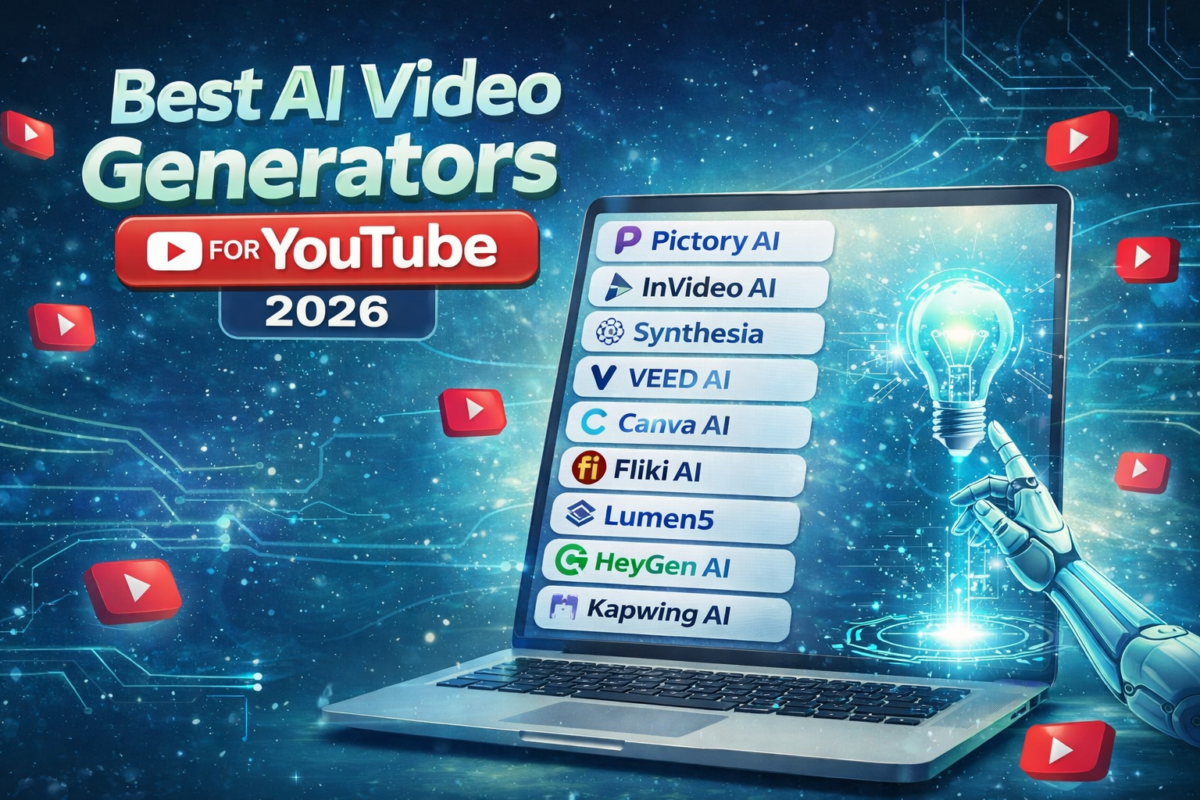
9 Best AI Video Generators for YouTube in 2026
1 Pictory AI (Best for YouTube automation)
Best for: Faceless YouTube channels Educational videos Automation content
Pictory AI is one of the most powerful AI video generators for YouTube automation creators who want to convert scripts, blog posts, or ideas into complete YouTube videos without editing experience. The platform automatically selects relevant stock footage, adds subtitles, generates voiceovers, and structures scenes based on your script. What makes Pictory especially valuable in 2026 is its ability to transform long content into short videos, which is useful for YouTube Shorts strategy. Many faceless YouTube channel creators use Pictory because it reduces production time and allows bulk video creation with consistent quality.
Why creators use it:
Pictory allows converting scripts into YouTube videos automatically. It selects relevant visuals and adds captions.
Key features:
- Script to video AI
- Blog to video converter
- Auto captions
- Voiceover generation
- Video summarizer
Pros:
- Easy interface
- Good stock library
- Automation friendly
- YouTube ready formats
Cons:
- Limited free usage
- Premium pricing
Best use case: YouTube automation channels.
2 InVideo AI (Best overall AI video generator)
Best for: Beginners Marketing videos YouTube content creators
InVideo AI is considered one of the best AI video makers for YouTube because it allows creators to generate videos simply by writing a prompt. Instead of manual editing, users can type a topic and the AI builds the script, visuals, transitions, and voiceover automatically. This makes it ideal for beginners starting YouTube channels or creators looking to scale production. Its template system and automation workflow make it particularly useful for marketing videos, educational videos, and content repurposing. InVideo AI also supports multiple export formats optimized for YouTube, making it a practical tool for content creators.
Why it stands out:
InVideo AI allows users to generate videos from simple prompts like:
“Make a YouTube video about passive income.”
I have personally used this tool to create several videos. I utilized the free version, which allows you to easily produce videos ranging from 3 to 4 minutes in length; specifically, the free version enables you to create up to three videos in a week
The AI creates:
- Script
- Scenes
- Voice
- Music
Features:
- Prompt based video creation
- AI editing
- Templates
- Text to video
- Social media export
Pros:
- Beginner friendly
- Fast rendering
- Many templates
Cons:
- Watermark in free version
Best for: Creators starting AI YouTube channels.
3 Synthesia (Best AI avatar video generator)
Best for: Educational channels Explainer videos Training videos
Synthesia stands out because it focuses on AI avatar based video creation instead of stock footage driven videos. This makes it especially useful for educational YouTube channels, online courses, and explainer content. With realistic AI presenters and multilingual voice support, creators can produce professional looking videos without hiring presenters or recording themselves. In 2026, Synthesia is widely used by businesses and authority creators because of its studio-quality output and ability to maintain brand consistency across videos. However, it is more suitable for informational content than entertainment style YouTube channels.
Unique advantage:
AI human avatars.
Instead of stock clips, you get AI presenters.
Features:
- AI avatars
- Multilingual voice
- Studio quality output
- Custom scripts
Pros:
- Professional videos
- Unique avatar system
- Corporate use ready
Cons:
- Expensive
- Not ideal for entertainment channels
Best use case: Education YouTube channels.
4 VEED AI (Best AI editing platform)
Best for: Editing YouTube videos using AI.
VEED AI is more than just a video generator; it works as an AI powered video editing platform that helps YouTubers improve content quality. It includes tools such as automatic subtitles, background noise removal, AI voice generation, and video enhancement features. This makes it useful for creators who already have footage but want to improve production quality using artificial intelligence. VEED is also popular among YouTubers because subtitles and captions increase watch time and engagement, which directly improves channel growth metrics.
Features:
- AI subtitle generator
- Background remover
- AI voice tools
- Video enhancement
Pros:
- Good editing features
- Clean interface
- Caption accuracy
Cons:
- Limited automation features.
Best use: Enhancing YouTube videos.
5 Canva AI Video Generator
Best for: Creators already using Canva.
Canva AI Video Generator is ideal for creators who want a simple drag and drop workflow combined with artificial intelligence features. It allows users to generate video scenes, write scripts, and design visuals in one place. Since many creators already use Canva for thumbnails, using Canva AI for video creation helps maintain branding consistency. Its template based workflow makes it especially useful for educational channels, tutorial videos, and design focused content. While it is not as automation focused as some other tools, it remains one of the easiest AI video tools to use.
Features:
- Magic media AI
- Video templates
- Drag drop editor
- AI script tools
Pros:
- Easy design workflow
- Template variety
- Brand kits
Cons:
- Less automation compared to Pictory.
Best use: Design heavy YouTube channels.
6 Fliki AI (Best text to video with voice)
Best for: Voice driven YouTube content.
Fliki AI is a strong option for creators who focus on voice driven storytelling content such as facts channels, documentary style videos, and educational content. It specializes in converting text into videos with realistic AI voices. The voice quality is one of its biggest strengths, making videos sound more natural compared to robotic AI narration tools. Fliki is especially useful for YouTube automation creators who want to quickly turn scripts into videos without complex editing. It is also commonly used for repurposing blog content into YouTube videos.
Features:
- Text to video
- AI voice library
- Blog to video
- Script conversion
Pros:
- Good voice realism
- Easy workflow
- Fast creation
Cons:
- Video customization limited.
Best use: Story channels.
7 Lumen5 (Best blog to YouTube video)
Best for: Bloggers turning articles into videos.
Lumen5 is particularly useful for bloggers and website owners who want to turn written content into YouTube videos. The platform uses AI to identify important parts of an article and match them with visuals. This makes it a good tool for content repurposing strategies where creators want to get additional traffic from YouTube using existing blog posts. While newer AI tools offer more automation, Lumen5 still remains valuable for marketing focused creators and brands that want to maintain consistent visual storytelling.
Features:
- Blog to video
- AI scene selection
- Branding options
Pros:
- SEO content reuse
- Marketing focused
Cons:
- Limited AI features compared to newer tools.
Best use: Website traffic repurposing.
8 HeyGen AI (Fast growing AI video tool)
Best for: AI presenter videos.
HeyGen AI is gaining popularity as a next generation AI video creation platform that focuses on realistic avatar videos and AI translation features. It allows creators to produce videos where AI presenters speak scripts naturally, which is useful for authority building YouTube channels. One of its strongest advantages is localization, allowing creators to target global audiences with translated videos. As AI presenter technology improves, tools like HeyGen are expected to become more important for scalable YouTube content production.
Features:
- AI avatars
- AI translation
- Script upload
- Face animation
Pros:
- Realistic avatars
- Modern AI tech
Cons:
- Requires paid plan.
Best use: Authority channels.
9 Kapwing AI (Best free AI video tool)
Best for: Free AI video creation.
Kapwing AI is a good starting tool for creators looking for a free AI video generator for YouTube. It combines basic AI video creation with editing tools like subtitles, trimming, and templates. While it does not have deep automation like premium tools, it offers enough features for beginners to start creating YouTube content without investment. Many small creators use Kapwing to test content ideas before moving to advanced paid AI video platforms.
Features:
- AI editing
- Subtitle tools
- Templates
Pros:
- Free plan available
- Good editing
Cons:
- Limited exports.
Best use: Budget creators.
Best Free AI Video Generators for YouTube Shorts
Short form video demand is exploding. Few competitors explain this properly.
Best tools for Shorts:
- InVideo AI
- Canva AI
- Kapwing
- VEED AI
Best workflow:
Step process:
1 Generate script 2 Create long video 3 Auto clip Shorts 4 Add captions 5 Export vertical format
Best AI Video Generator Apps for Android
Mobile creators need app based tools.
Best Android options:
- Canva app
- CapCut AI
- InVideo mobile
- VN editor AI features
Best strategy:
Use: AI script → Mobile edit → Upload.
How to Choose the Best AI Video Generator
Most sites miss this practical framework.
Use this decision method:
Choose based on your channel type:
Automation channel: Pictory Fliki
Education: Synthesia HeyGen
Shorts: Canva InVideo
Free creators: Kapwing
Features You Must Check Before Choosing
Important factors:
1 Voice quality
Bad voice reduces watch time.
2 Stock library
Better visuals increase retention.
3 Export quality
Minimum 1080p required.
4 Subtitle automation
Captions increase engagement.
5 Monetization suitability
Check commercial license.
Free vs Paid AI Video Generators
Free tools:
Advantages:
- No investment
- Testing possible
- Beginner friendly
Disadvantages:
- Watermark
- Limited exports
- Fewer voices
Paid tools:
Advantages:
- Professional output
- Monetization safe
- Better AI features
Disadvantages:
- Monthly cost
Recommendation:
Start free. Upgrade after monetization.
Which AI Video Generator is Best for Different YouTube Niches?
Choosing the best AI video generator depends heavily on the type of YouTube channel you want to build. Different tools are optimized for different workflows such as automation, storytelling, educational videos, or Shorts production. Instead of picking randomly, creators should match the AI tool with their content model.
Below is a practical breakdown based on real creator workflows.
Best AI Video Generators for Faceless YouTube Channels
Faceless YouTube channels depend heavily on AI because they rely on stock footage, voiceovers, and scripted storytelling instead of personal recording.
Best tools:
Pictory AI – Best overall choice
Fliki AI – Best for voice storytelling
InVideo AI – Best beginner option
Why these work:
These tools provide:
- Script to video conversion
- AI voice narration
- Automatic visuals
- Caption generation
This allows creators to build channels in niches like:
- Facts channels
- Finance channels
- AI news channels
- Tech explainers
- Motivation videos
Important tip:
Faceless channels perform better when you combine: AI video generator + custom thumbnails + SEO titles.
Best AI Video Generators for YouTube Automation Channels
YouTube automation channels require tools that allow bulk production and fast workflows.
Best options:
Pictory AI – Best automation workflow
InVideo AI – Fast content generation
Fliki AI – Fast script conversion
Automation creators usually follow this system:
Keyword research → Script AI → Video AI → Voice AI → Upload.
What matters most:
- Speed
- Batch production
- Voice quality
- Scene automation
Most competitors miss this:
Automation success depends more on workflow efficiency than editing quality.
Best AI Video Generators for YouTube Shorts Creators
Short form content requires speed and vertical formatting.
Best tools:
InVideo AI – Prompt based Shorts Canva AI – Template based Shorts VEED AI – Caption driven Shorts Kapwing – Free Shorts editing
Important Shorts features:
- Vertical export (9:16)
- Subtitle automation
- Fast rendering
- Hook based editing
Best Shorts strategy:
Instead of making Shorts separately:
Create long video → Clip into Shorts → Add captions → Upload daily.
This multiplies content output.
Best AI Video Generators for Educational YouTube Channels
Educational channels need clarity and structured presentation.
Best tools:
Synthesia – AI presenter videos
HeyGen AI – Avatar lectures
Canva AI – Slide based videos
Why these tools work:
Educational videos benefit from:
- AI presenters
- Visual explanations
- Structured narration
- Multilingual options
Best niches:
- Online courses
- Tutorials
- Software guides
- AI education
- Digital skills
Pro tip:
Educational videos have higher CPM compared to entertainment.
Best AI Video Generators for Storytelling Channels
Story channels are one of the fastest growing YouTube automation niches.
Best tools:
Fliki AI – Best voice realism
Pictory AI – Visual storytelling
InVideo AI – Script driven creation
Story niches include:
- Horror stories
- Mystery channels
- Space facts
- History stories
- Reddit stories
Important factor:
Voice quality matters more than visuals in storytelling channels.
Retention depends on narration quality.
Best AI Video Generators for Tech YouTube Channels
Tech channels benefit from:
Screen recordings
Explainer visuals
AI editing tools
Best tools:
VEED AI Canva AI InVideo AI
Use case:
- Gadget reviews
- AI tools videos
- Software tutorials
- Comparison videos
Best AI Video Generators for Beginners
If someone is starting from zero:
Best beginner tools:
InVideo AI Canva AI Kapwing
Why:
- Simple interface
- Templates
- No editing skills required
Avoid complex tools initially.
Focus on publishing consistency.
Many creators also compare different AI writing tools before choosing their content workflow. If you want alternatives to popular AI writing assistants, you can explore our comparison of AI tools better than ChatGPT for writing where we analyze platforms useful for content creators and bloggers.
Quick Comparison Table
| Channel Type | Best AI Tool |
|---|---|
| Faceless YouTube channel | Pictory AI |
| YouTube automation | Pictory AI |
| YouTube Shorts | InVideo AI |
| Educational videos | Synthesia |
| Story channels | Fliki AI |
| Beginners | Canva AI |
| Free creators | Kapwing |
| Marketing videos | InVideo AI |
Choosing the best AI video generators for YouTube depends on your content type and automation needs.
Final Recommendation
Instead of using one tool, most successful creators combine tools.
Example workflow:
Script → ChatGPT
Voice → Fliki
Video → Pictory
Editing → VEED
Thumbnail → Canva
This hybrid workflow produces better results than relying on one platform.
Complete Step-by-Step Process to Create a YouTube Video Using AI
AI tools alone do not guarantee YouTube success. What actually works is following a structured workflow used by successful YouTube automation creators. In 2026, most scalable YouTube channels follow a production pipeline where each step uses a specialized AI tool.
Below is the exact process used by many AI YouTube creators.
Step 1 – Keyword Research (Most Important Step)
Before making a video, creators first find topics people are searching for. This is where most beginners fail because they start with random ideas instead of search demand.
Best ways to find YouTube video ideas:
- YouTube search suggestions
- Google autocomplete
- SEO tools
- Competitor channels
- Trending AI topics
Example search patterns:
Search: AI tools
YouTube shows: AI tools for students
AI tools for YouTubers
Free AI tools
These are real content ideas.
Pro tip:
Always choose topics with:
Search demand
Evergreen interest
Low competition
Bad approach: Make random videos.
Good approach: Make search based videos.
Step 2 – Script Generation Using AI
Once the topic is selected, the next step is script writing.
AI script tools:
ChatGPT
Claude
Gemini
Workflow:
Give prompt:
Write YouTube script about best AI tools for students with hook, intro, main points and conclusion.
Then improve:
- Add storytelling
- Add statistics
- Add examples
- Shorten sentences
Important:
Never use raw AI script.
Always: Rewrite + improve + structure.
This improves monetization chances.
Step 3 – AI Voice Generation
If you run a faceless YouTube channel, voice quality directly affects watch time.
Best AI voice tools:
Fliki
ElevenLabs
PlayHT
Best practices:
Choose:
Natural voice
Neutral accent
Clear pacing
Avoid:
Robotic voices.
Retention drops quickly with bad voiceovers.
Pro creator trick:
Reduce voice speed to 0.95.
Sounds more natural.
Step 4 – Video Generation Using AI Tools
Now convert script into video.
This is where tools like:
Pictory
InVideo
Lumen5
become useful.
Typical workflow:
Upload script → AI splits scenes → AI adds visuals → AI adds captions.
Then improve manually:
Change visuals
Add zoom effects
Improve scene timing
Why manual improvement matters:
YouTube prefers edited content.
Pure AI content may struggle to monetize.
Step 5 – AI Editing Improvements
After video creation, smart creators always enhance videos.
Enhancements include:
Subtitle styling
Music balancing
Scene transitions
Hook improvement
Best tools:
VEED AI
CapCut
Premiere AI features
Important improvements:
Add captions in first 5 seconds.
This improves retention.
Step 6 – Thumbnail Creation
Thumbnail often matters more than editing.
CTR drives growth.
AI thumbnail tools:
Canva
Photoshop AI
Ideogram
Midjourney (concepts)
Thumbnail rules:
High contrast colors
Big readable text
Emotion
Curiosity
Bad example:
Plain screenshot.
Good example:
Bold headline + visual hook.
Thumbnails play a critical role in YouTube growth because they directly impact click through rate. Many creators now use AI image generators to design thumbnails quickly without graphic design skills. If you want to explore these tools, check our guide on best free AI image generators for bloggers where we cover tools useful for thumbnails and blog graphics.
Step 7 – Upload Process
Most creators lose views here.
Proper upload structure:
Title formula:
Main keyword + curiosity.
Example:
Best AI video generators for YouTube (Free tools that save 10 hours)
Description structure:
Paragraph 1: Keyword summary
Paragraph 2: Video summary
Paragraph 3: Related keywords
Add:
Tags
Chapters
Hashtags
Step 8 – AI Generated YouTube Description
Many creators ignore description SEO.
Add:
Primary keyword Secondary keywords Topic variations
Example keyword variations:
AI video generator
AI YouTube tools
AI video maker
This helps search discoverability.
Step 9 – Publishing Consistency
AI advantage is speed.
Winning creators publish:
3–5 videos weekly.
Consistency beats perfection.
Suggested schedule:
2 long videos
3 Shorts
AI makes this possible.
Step 10 – Content Scaling Strategy
Once workflow works:
Scale production.
Automation model:
Research → Script → Voice → Video → Upload.
Goal:
Reduce production time.
Target:
1 video daily.
Real Example Of YouTube Automation Creators
Example production stack:
Keyword research: SEO tools
Script: ChatGPT
Voice: Fliki
Video: Pictory
Editing: VEED
Thumbnail: Canva
Upload: YouTube Studio
This structured workflow produces consistent content.
How Long Does AI YouTube Video Creation Take?
With workflow:
Script: 10 minutes
Voice: 5 minutes
Video: 15 minutes
Editing: 15 minutes
Thumbnail: 10 minutes
Total:
45–60 minutes per video.
Traditional workflow:
4–8 hours.
AI gives massive efficiency advantage.
Advanced Creator Tips
High level creators also do:
Voice variation
Scene pacing changes
Pattern interrupts
Hook rewriting
Retention tricks:
Ask questions early.
Example:
What if you could make YouTube videos without editing?
This keeps viewers watching.
AI YouTube Growth Strategy for 2026
Winning formula:
Search based content
AI production
CTR thumbnails
Consistency
Niche authority
Big mistake:
Tool obsession.
Real success comes from:
Topic selection.
Mistakes Beginners Make When Creating AI YouTube Videos
Avoid these:
Uploading without SEO
Using robotic voices
Low effort scripts
No thumbnails
No niche focus
Most failed channels fail due to strategy, not tools.
Final AI YouTube Success Formula
Winning system:
Good topic
Good script
Good voice
Good thumbnail
Consistency
Tools help.
Strategy wins.
Complete AI YouTube Creator Toolkit (2026 Professional Tool Stack)
Serious YouTube creators do not rely on just one AI video generator. Instead, they build a complete AI production ecosystem where each tool solves a specific part of the workflow. This system approach allows creators to scale channels faster and maintain consistent quality.
Below is the actual AI toolkit structure many modern YouTube automation creators follow.
AI Tools for YouTube Research (Finding Video Ideas)
The foundation of YouTube growth is topic selection. Even the best AI video generator cannot save a bad topic.
Best research tools:
ChatGPT → Topic brainstorming
Google Trends → Trend validation
TubeBuddy → Keyword research
VidIQ → Competition analysis
What smart creators do:
They look for:
Low competition topics
Evergreen niches
Search based ideas
Emerging AI trends
Pro strategy:
Combine: YouTube suggestions + Google trends.
This identifies rising content ideas early.
AI Tools for Script Writing
Script quality determines retention. AI can help but must be guided.
Best script tools:
ChatGPT
Claude AI
Gemini AI
Best workflow:
Generate script → Rewrite manually → Add hook → Add examples → Simplify language.
Important improvement method:
Always add:
Story element
Problem solution structure
Curiosity hook
This improves average view duration.
AI Voice Generator Tools Used by YouTubers
Voice is one of the biggest retention factors for faceless channels.
Best AI voice tools in 2026:
Fliki
ElevenLabs
PlayHT
LOVO AI
What professionals look for:
Human sounding voice
Emotion control
Pacing control
Commercial license
Pro tip:
Use slightly slower speech speed.
Natural pacing improves engagement.
AI Video Creation Tools (Core Production Tools)
This is where AI video generators come into the workflow.
Best tools:
Pictory → Automation channels
InVideo → General creators
Synthesia → Educational channels
Canva → Design channels
Important strategy:
Choose tool based on content type.
Not popularity.
AI Video Editing Tools Used by Creators
Even AI videos need improvement.
Best editing tools:
VEED AI
CapCut
Descript
Premiere Pro AI tools
Important editing improvements:
Remove pauses
Improve hook
Add zoom effects
Improve subtitles
Small edits improve retention significantly.
AI Thumbnail Creation Tools
Many creators underestimate thumbnails.
But CTR often decides success.
Best thumbnail tools:
Canva
Photoshop AI
Midjourney (concept art) Ideogram
Winning thumbnail formula:
Curiosity
Contrast
Emotion
Clear text
Avoid:
Too many words.
3–5 words works best.
AI Tools for YouTube SEO Optimization
Publishing optimization is often ignored.
Best SEO tools:
TubeBuddy
VidIQ
Google Keyword Planner
ChatGPT (title ideas)
Optimize:
Title Description Tags Chapters
Important:
SEO helps discovery.
CTR helps growth.
Retention helps recommendation.
All three matter.
AI Tools for YouTube Shorts Creation
Some of the best AI video generators for YouTube also support automatic Shorts creation, making them useful for multi-format content strategies.
Shorts are now growth accelerators.
Best tools:
CapCut
InVideo AI
Canva AI
VEED AI
Shorts strategy:
Convert long videos into multiple Shorts.
Example:
One 8 minute video can produce:
5–10 Shorts.
This multiplies reach.
AI Tools for YouTube Automation Channels
Automation creators focus on speed.
Common stack:
ChatGPT → Script
Fliki → Voice
Pictory → Video
Canva → Thumbnail
Goal:
Reduce production friction.
Automation success depends on process optimization.
AI Tools for YouTube Channel Growth Analytics
Growth requires data.
Best analytics tools:
YouTube Studio
VidIQ
TubeBuddy
Track:
CTR Watch time Retention Impressions
Data driven creators grow faster.
Recommended AI Tool Stack (Beginner Setup)
If starting from zero:
Use:
ChatGPT → Script
InVideo → Video
Canva → Thumbnail
Simple and effective.
Recommended AI Tool Stack (Intermediate Creator)
Upgrade to:
ChatGPT → Script
Fliki → Voice
Pictory → Video
VEED → Editing
Canva → Thumbnail
Better quality output.
Some YouTube creators also combine AI video generators with screen recording tools when making tutorials, software demos, or educational videos. If you are planning tutorial content, you may also find our guide on best free screen recorder for PC without watermark helpful.
Recommended AI Tool Stack (Advanced Creator)
Professional stack:
SEO tool → Topic
ChatGPT → Script
ElevenLabs → Voice
Pictory → Video
Premiere AI → Editing
Photoshop AI → Thumbnail
VidIQ → SEO
This is similar to serious automation channels.
Budget vs Professional Creator Setup
Free setup:
ChatGPT free
Canva free
Kapwing free
Paid setup:
Pictory
Fliki
VidIQ
ElevenLabs
Best approach:
Start free.
Upgrade after revenue.
Future AI Tools YouTubers Should Watch
Emerging tools focus on:
AI editing agents
Auto video creation
AI storytelling
AI animation
Future advantage will go to creators who adapt quickly.
Final Creator Strategy Insight
Beginners think:
Best tool wins.
Reality:
Best system wins.
Successful YouTubers build:
Repeatable workflow
Topic research process
Content production system
Tools support strategy.
They do not replace it.
Using the best AI video generators for YouTube with the right strategy can help creators scale faster in 2026.
Best AI Video Generator for Faceless YouTube Channel
Choosing the best AI video generator for a faceless YouTube channel depends on how well the tool can automate visuals, voiceovers, and editing without requiring personal recording. Tools like Pictory AI and Fliki AI are widely used because they allow creators to convert scripts into complete YouTube videos with AI voice narration and stock footage. These platforms are especially useful for niches like facts channels, finance explainers, motivation videos, and AI news content. The biggest advantage is scalability because faceless channels rely on consistency, and AI video generators allow creators to produce multiple videos weekly without traditional production costs.
Best AI Video Maker for YouTube Shorts
The best AI video maker for YouTube Shorts should support vertical video export, automatic captions, and fast editing capabilities. Tools like Canva AI, InVideo AI, and VEED AI are commonly used because they provide templates specifically designed for short form video platforms. Shorts creators benefit from AI tools because they can quickly convert long YouTube videos into multiple short clips, allowing them to increase content output. AI caption generation is also important because most Shorts viewers watch videos without sound, making subtitles essential for engagement and retention.
Best Free AI YouTube Video Generator
For creators starting with zero budget, free AI YouTube video generators like Kapwing and Canva AI offer a good starting point. These platforms provide basic AI video creation features such as templates, text to video conversion, and simple editing tools. While free tools usually include watermarks or export limitations, they are still useful for testing content ideas before investing in premium software. Many successful creators initially use free AI video generators to validate their niche before upgrading to paid tools that offer better voice quality, automation features, and higher resolution exports.
Best AI Video Creator for Beginners
Beginners need AI video creators that prioritize simplicity over advanced features. InVideo AI and Canva AI are among the best options because they provide guided workflows, templates, and prompt based video creation. A beginner friendly AI video generator should allow users to create a video by simply entering a topic and letting the AI handle scripting, visuals, and editing. The best approach for beginners is to focus on publishing consistently instead of trying to master complex editing tools. Simple AI platforms help reduce the learning curve and allow new creators to focus on content strategy and niche selection.
Best AI Video Generator (Overall Recommendation)
If someone is looking for the best AI video generator overall, the answer depends on the use case. InVideo AI is often considered the best overall choice for general YouTube creators because of its ease of use and prompt based generation. Pictory AI is better suited for YouTube automation workflows, while Synthesia works well for educational content using AI avatars. Free creators may prefer Kapwing or Canva AI, while advanced creators often combine multiple AI tools to build a professional content production workflow.
Below is a high-ranking SEO FAQ section designed to capture People Also Ask, featured snippets, and long-tail traffic. These questions are based on real search patterns around best AI video generators for YouTube and related keywords.
You can paste this at the end of your article.
Common Mistakes When Using AI Video Generators
Content gap many sites ignore.
Avoid these:
Mistake 1 Copy paste scripts
Always rewrite scripts.
Mistake 2 Low quality voice
Use realistic voices.
Mistake 3 No editing
Add manual improvements.
Mistake 4 No niche research
AI cannot replace research.
Mistake 5 Ignoring thumbnails
CTR matters more than editing.
AI Video Generator Workflow Used by YouTube Automation Channels
Actual workflow used by automation creators:
Step 1 Keyword research Step 2 Script generation Step 3 AI video generation Step 4 AI voice Step 5 Editing improvements Step 6 Thumbnail design Step 7 Upload optimization
Best Niches for AI Generated YouTube Channels Using Best AI Video Generators for YouTube
High success niches:
- Finance facts
- Tech explainers
- Motivation
- AI tools
- Facts channels
- Education
- Top 10 lists
- Documentary style
Avoid:
- Personality driven niches.
Can AI Generated Videos from Best AI Video Generators for YouTube Get Monetized?
Yes if:
Content must be:
- Original
- Edited
- Valuable
- Not spam
YouTube requires transformation.
Add:
- Voice edits
- Visual changes
- Commentary
- Structure changes
Future of AI Video Creation (2026 Trends)
Upcoming trends:
- Real time video AI
- One click YouTube channels
- AI storytelling
- AI editing agents
- Voice cloning growth
Creators using AI early gain advantage.
Best AI Video Generator for Different Use Cases
Best overall:
InVideo AI
Best automation:
Pictory
Best free:
Kapwing
Best avatar:
Synthesia
Best design:
Canva
Best voice:
Fliki
FAQs About Best AI Video Generators for YouTube
What is the best AI video generator for YouTube in 2026?
The best AI video generator for YouTube depends on your content type. InVideo AI is considered one of the best overall tools because of its prompt-based video creation, while Pictory AI is better suited for YouTube automation channels. Synthesia is a good option for educational creators who want AI avatar videos. Beginners may prefer Canva AI because of its simple interface and templates.
Can I make YouTube videos completely using AI?
Yes, it is possible to create YouTube videos completely using AI tools. Many creators use AI for script writing, voice generation, video creation, subtitles, and thumbnails. However, it is recommended to add manual improvements such as editing, better hooks, and custom thumbnails to improve monetization chances and viewer engagement.
Which AI video generator is best for faceless YouTube channels?
Pictory AI and Fliki AI are among the best AI video generators for faceless YouTube channels because they provide script to video conversion, AI voiceovers, and automatic visuals. These tools are commonly used in niches like facts videos, motivation channels, tech explainers, and finance content.
What is the best free AI video generator for YouTube?
Kapwing and Canva AI are good free AI video generators for YouTube beginners. They allow users to create videos using templates and AI editing features without initial investment. However, free versions may include watermarks or export limits, so serious creators often upgrade to premium tools later.
Which AI video generator is best for YouTube Shorts?
InVideo AI, Canva AI, and VEED AI are good options for creating YouTube Shorts because they support vertical video formats and automatic captions. Shorts creators should focus on tools that allow fast editing and quick exports because consistency is important in short form content growth.
How long does it take to create a YouTube video using AI?
Using AI tools, a YouTube video can be created in about 45 to 90 minutes depending on the editing level. Script generation may take around 10–15 minutes, voice generation 5–10 minutes, video creation 15–30 minutes, and thumbnail creation another 10–15 minutes. This is significantly faster compared to traditional video production.
Do I need editing skills to use AI video generators?
No, most modern AI video generators are designed for beginners and require no professional editing skills. Tools like InVideo AI and Canva AI allow creators to generate videos using prompts and templates. However, learning basic editing improvements can significantly increase video quality and retention.
Which AI video generator is best for beginners?
InVideo AI and Canva AI are considered beginner friendly because they provide guided workflows, ready templates, and simple interfaces. Beginners should prioritize ease of use and publishing consistency rather than complex features when selecting an AI video generator.
Are AI video generators safe to use for YouTube?
Yes, AI video generators are safe if you use licensed media and original scripts. Most reputable AI video platforms provide commercial usage rights for content created on their platform. Always check licensing terms if you plan to monetize your videos.
Can AI video generators replace video editors?
AI video generators can reduce editing work but cannot completely replace creative editing. Professional creators still improve AI generated videos by adjusting pacing, adding better hooks, improving storytelling, and optimizing thumbnails. AI should be seen as a productivity tool rather than a full replacement.
What features should I look for in an AI video generator?
Important features to check include:
- Text to video capability
- AI voice quality
- Stock footage library
- Subtitle generation
- Export quality
- Commercial usage rights
- Editing flexibility
Choosing a tool based on these factors helps ensure long term usability.
Is AI video creation the future of YouTube content?
AI video creation is becoming an important part of YouTube content production because it reduces time, cost, and technical barriers. While AI will not replace creativity, creators who use AI tools effectively can produce more content and test more ideas, giving them a competitive advantage.
How many AI videos should I upload per week?
Consistency matters more than volume. Most AI YouTube creators try to upload at least 2–4 long videos per week and several Shorts. AI tools make this possible because they reduce production time compared to traditional workflows.
Can beginners start YouTube automation using AI tools?
Yes, beginners can start YouTube automation using AI tools by following a simple workflow: keyword research, AI script writing, AI voice generation, AI video creation, thumbnail design, and SEO optimized uploading. Starting with free tools is usually recommended before investing in premium platforms.
What is the best AI video generator for YouTube?
InVideo AI and Pictory are among the best AI video generators for YouTube creators due to automation features.
Can I start a YouTube channel using AI?
Yes. Many creators run faceless channels using AI video generators.
Are free AI video generators good?
Yes but paid tools offer better quality.
Which AI tool is best for YouTube Shorts?
Canva and InVideo AI are good for Shorts.
Is AI video creation legal?
Yes if content is original.
Conclusion: Choosing the Best AI Video Generators for YouTube in 2026
The best AI video generators for YouTube depends on your budget, content strategy, and production goals. Some creators prefer free AI video generators for YouTube to test ideas, while others invest in premium AI video maker tools for YouTube automation to scale faster.
As AI technology continues to evolve, the best AI video generators for YouTube are becoming essential tools for creators who want to stay competitive. Whether you are building a faceless YouTube channel, creating YouTube Shorts, or launching a YouTube automation business, these AI video generators can significantly reduce effort while improving content consistency.
If you are just starting, begin with beginner-friendly AI video generators for YouTube like InVideo AI or Canva AI. Advanced creators may prefer automation focused tools like Pictory AI or Fliki AI.
AI video generators are becoming essential tools for YouTube creators in 2026. Whether you want to start a YouTube automation channel, create Shorts, or scale content production, these tools significantly reduce effort and cost.
In the end, the best AI video generators for YouTube are those that fit your workflow and help you publish consistently. The creators who succeed in 2026 will not be those with the best editing skills, but those using the best AI video generators for YouTube combined with smart content strategy.
The best strategy is not just choosing tools but combining them into a workflow:
Research → Script → AI video → Editing → SEO upload.
Creators who adopt AI video tools early will dominate future YouTube growth because content speed is now a ranking advantage.
If you want the safest recommendation:
Start with: InVideo AI or Pictory.
Upgrade when revenue starts.
This post on the best AI video generators for YouTube is regularly updated to include new AI tools and feature updates.

Sumit Pandey is the founder of GyanSaga
I research and write helpful articles on home appliances, gaming gear, and everyday products to help users make better buying decisions.
My recommendations are based on research, user reviews, and real-world use.
Some links may be affiliate links at no extra cost to you.Sumit is the founder of Gyansaga, a technology and AI tools blog focused on blogging, SEO, and digital productivity. He researches AI software, blogging tools, and content creation platforms to help creators grow traffic and improve workflows. His content focuses on practical comparisons, tool testing, and SEO strategies.Hi, I’m Sumit Pandey, founder of GyanSaga. I write detailed guides about AI tools, blogging, SEO, and digital productivity software. My goal is to help bloggers, students, and content creators find the best tools to improve their workflow and grow online. I test AI tools, blogging platforms, and content creation software to provide practical comparisons and research-based recommendations.