Artificial intelligence is rapidly changing how students study, complete assignments, and manage academic workloads. The 10 Best AI Tools Students Should Use for Study and Productivity are no longer optional advantages but practical systems that help students research faster, write better assignments, manage time efficiently, and improve exam performance.
Students today face three major academic problems: information overload, poor study organization, and limited time. AI tools directly solve these issues by acting as research assistants, writing editors, productivity managers, and revision coaches. Instead of spending five hours researching a topic manually, students can now build structured notes in less than one hour.
Search demand for terms like AI study tools, best AI tools for students, and AI productivity tools for college students continues growing because students want practical tools rather than theory.
This guide goes beyond simple tool lists. It explains workflows, comparisons, decision frameworks, expert strategies, and real use cases so students can build a complete AI study system rather than randomly using tools without results.
If used correctly, these tools can realistically improve efficiency by 30–70 percent.
Students using the 10 Best AI Tools Students Should Use for Study and Productivity can significantly improve their academic workflow.
Table of Contents
Quick Answer: Best AI Tools Students Should Use for Study and Productivity
If you want a fast recommendation list, here are the most effective tools students should consider:
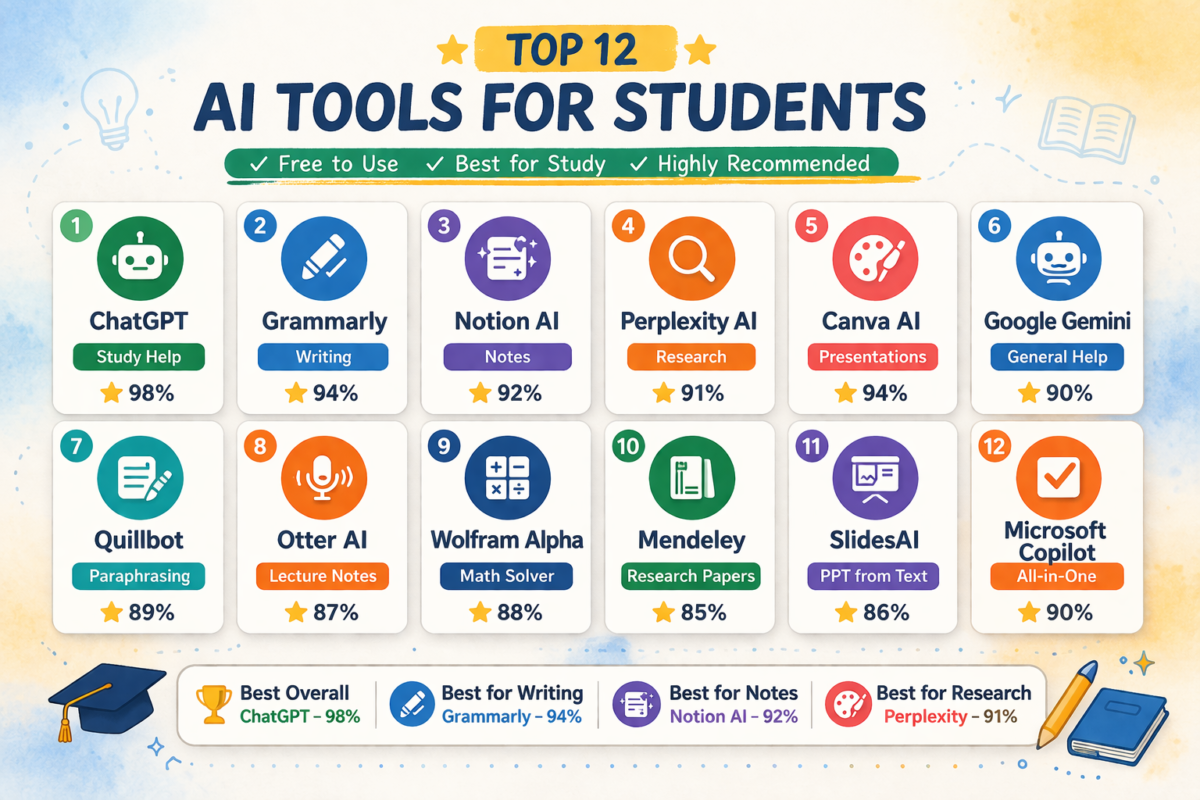
ChatGPT – Best overall AI study assistant
Notion AI – Best productivity workspace
Grammarly – Best writing improvement AI
Perplexity AI – Best AI research engine
Quizlet AI – Best revision tool
Canva AI – Best presentation maker
Otter AI – Best lecture transcription AI
Tome AI – Best AI presentation generator
Wolfram Alpha – Best math AI solver
Motion AI – Best AI scheduler
Quick selection based on use case:
Best for homework → ChatGPT
Best for research → Perplexity AI
Best for organization → Notion AI
Best for exams → Quizlet AI
Best for writing → Grammarly
Recommended AI stack for maximum productivity:
ChatGPT for understanding
Perplexity for research
Notion for notes
Grammarly for editing
Students using this stack typically reduce assignment completion time significantly.
Understanding AI Study Tools and Their Academic Benefits
AI study tools are software platforms that use artificial intelligence to help students automate learning processes such as note creation, concept explanation, summarization, and writing assistance.
Definition:
AI study tools are digital platforms that use machine learning and language models to improve academic productivity through automation and intelligent assistance.
Core functions include:
Text summarization
Concept explanation
Research assistance
Grammar correction
Practice question generation
Study planning
Traditional study method problems:
Too many sources
Unorganized notes
Manual summaries
Weak revision strategy
AI enhanced study process:
Ask AI question
Get simplified explanation
Generate structured notes
Create test questions
Review efficiently
Key productivity benefits:
Faster understanding
Better note structure
Improved writing quality
Better exam preparation
Time optimization
Students often misunderstand AI tools as shortcuts. In reality, the biggest benefit comes from structured use.
Example:
Weak usage:
Generate answer
Submit answer
Smart usage:
Generate outline
Understand concept
Write personally
Edit with AI
This creates skill improvement instead of dependency.
Deep Guide: How Students Should Build an AI Study Workflow
Most productivity improvements come from systems rather than tools alone.
Recommended AI academic workflow:
Research phase:
Use Perplexity AI to find sources
Collect reference material
Generate overview
Understanding phase:
Use ChatGPT for explanation
Break complex topics
Generate examples
Organization phase:
Use Notion AI to structure notes
Create topic databases
Build revision lists
Writing phase:
Generate outline
Draft introduction
Add examples
Editing phase:
Improve grammar
Enhance clarity
Check tone
Revision phase:
Generate flashcards
Create practice tests
Simulate exams
Example real workflow:
Assignment: Renewable Energy Sources
Step 1:
Search Perplexity:
Types of renewable energy
Step 2:
Ask ChatGPT:
Explain solar vs wind energy with examples.
Step 3:
Create notes in Notion:
Definitions
Advantages
Disadvantages
Examples
Step 4:
Generate questions:
Create 10 exam questions from this topic.
Step 5:
Revise using Quizlet.
Total time saved: 4 hours.
This is how the 10 Best AI Tools Students Should Use for Study and Productivity become practical systems rather than simple apps.
Best AI Tools Students Should Use for Study and Productivity
Below are the most effective tools based on real student workflows, reliability, and productivity gains.
ChatGPT – Best Overall AI Study Assistant
Primary use cases:
Homework help
Concept explanation
Coding help
Essay drafting
Idea generation
Why it works:
ChatGPT acts like an adaptive tutor. Students can request explanations at different difficulty levels.
Example prompt:
Explain Newton’s laws with real life examples and formulas.
Better learning prompt:
Explain Newton’s laws like I am preparing for exams and add possible questions.
Advantages:
Multi subject support
Fast responses
Flexible prompts
Free version available
Disadvantages:
Needs fact checking
Generic answers if prompts weak
Best for:
School students
College students
Competitive exam preparation
Notion AI – Best AI Productivity Workspace
Notion AI combines:
Notes
Tasks
Database
Calendar
AI writing
Students can build a complete academic dashboard.
Example structure:
Subject database
Assignment tracker
Revision planner
Exam calendar
AI functions:
Summarize notes
Generate tasks
Extract key ideas
Example use:
Paste lecture notes.
Prompt:
Extract important definitions and formulas.
Advantages:
All in one system
Strong organization
Flexible layouts
Disadvantages:
Requires setup time
AI features partly paid
Best for:
Organized learners
Research students
Project based courses
Grammarly – Best AI Writing Assistant
Grammarly improves writing through:
Grammar correction
Clarity suggestions
Tone adjustment
Vocabulary enhancement
Example:
Original:
Technology is very helpful and makes many things easy.
Improved:
Technology significantly improves efficiency and simplifies complex processes.
Advantages:
Instant correction
Better academic writing
Browser integration
Disadvantages:
Premium features locked
Sometimes overly strict suggestions
Best for:
Essays
Reports
Research writing
Perplexity AI – Best AI Research Tool
Perplexity combines AI and search engines with citations.
Students benefit because sources are visible.
Use cases:
Research papers
Academic exploration
Reference discovery
Example search:
Impact of AI in education.
Output includes:
Summary
Sources
Follow up questions
Advantages:
Source based answers
Faster research
Structured exploration
Disadvantages:
Limited deep journal integration
Free tier limits
Best for:
Research assignments
Literature review
Academic writing
Quizlet AI – Best AI Revision Tool
Quizlet uses active recall methods.
Functions:
Flashcards
Tests
Games
Memory training
Example workflow:
Upload notes
Generate flashcards
Practice tests
Advantages:
Strong retention
Exam preparation
Mobile friendly
Disadvantages:
Premium learning modes paid
Best for:
Medical students
Law students
Language learners
Canva AI – Best Visual Assignment Tool
Canva AI helps with:
Slides
Infographics
Posters
Visual projects
AI features:
Magic design
AI text generation
Image tools
Example:
Topic:
Digital Marketing.
Canva generates:
Slide design
Content structure
Icons
Advantages:
Beginner friendly
Fast design
Free templates
Disadvantages:
Common designs if not customized
Best for:
Presentations
Visual assignments
Projects
Otter AI – Best Lecture Note Generator
Otter records lectures and converts them into text.
Functions:
Recording
Transcription
Highlights
Advantages:
Never miss notes
Search transcripts
Save time
Disadvantages:
Limited free minutes
Best for:
Fast lectures
Online classes
Revision notes
Tome AI – Best AI Presentation Generator
Tome generates structured presentations.
Example prompt:
Create presentation on climate change impacts.
Output:
Slides
Flow
Talking points
Advantages:
Fast creation
Modern designs
Disadvantages:
Needs editing
Best for:
Quick presentations
Project pitches
Wolfram Alpha – Best STEM Problem Solver
Wolfram Alpha helps with:
Mathematics
Physics
Chemistry
Example:
Integrate equation.
Output:
Answer
Steps
Graphs
Advantages:
Accurate solutions
Step explanation
Disadvantages:
Technical interface
Best for:
Engineering students
STEM majors
Motion AI – Best Productivity Scheduler
Motion automatically schedules tasks.
Features:
Task planning
Auto scheduling
Deadline management
Advantages:
Reduces procrastination
Optimizes time
Disadvantages:
Premium focused
Best for:
Busy schedules
Multiple subjects
Comparison Analysis: Choosing the Right AI Tools
When comparing the 10 Best AI Tools Students Should Use for Study and Productivity, students should focus on their academic needs rather than popularity.
Tool selection depends on academic goals.
Writing:
ChatGPT
Grammarly
Research:
Perplexity
ChatGPT
Productivity:
Notion
Motion
Revision:
Quizlet
Presentations:
Canva
Tome
Math:
Wolfram Alpha
Decision framework:
Need everything → ChatGPT
Need structure → Notion
Need exam success → Quizlet
Need writing quality → Grammarly
Recommended combination:
ChatGPT
Notion
Grammarly
Quizlet
This covers 80 percent of student needs.
Decision factors:
Budget
Subject
Workload
Study style
Students should test free plans first.
Expert Tips to Use AI Tools Effectively
Top productivity students use AI strategically.
Expert tips:
Use AI for understanding not copying
Always verify facts
Use structured prompts
Combine multiple tools
Review outputs
Prompt engineering example:
Weak:
Explain photosynthesis.
Strong:
Explain photosynthesis step by step with diagrams and exam questions.
Better prompts produce better answers.
Advanced technique:
AI questioning method.
Ask:
Test me on this chapter.
This improves retention.
Another method:
Mistake analysis.
Upload wrong answers.
Prompt:
Explain why these answers are wrong.
This builds understanding.
Mistakes Students Must Avoid
Major AI misuse problems:
Copy paste assignments
Blind trust in AI
Using too many tools
Ignoring learning
Academic risk:
Universities increasingly detect AI text.
Solution:
Rewrite outputs
Add examples
Add personal analysis
Wrong method:
Generate essay
Submit
Correct method:
Generate outline
Write yourself
Edit with Grammarly
Another mistake:
Tool overload.
Better strategy:
Use 3 core tools.
Recommended:
ChatGPT
Notion
Quizlet
Master tools instead of collecting tools.
Pro Strategies for Maximum AI Productivity
High performers build systems.
Strategy 1:
AI research pipeline:
Perplexity research
ChatGPT explanation
Notion organization
Strategy 2:
AI writing system:
ChatGPT draft
Grammarly editing
Manual improvement
Strategy 3:
AI revision loop:
Notes
Quizlet
Practice tests
Advanced strategy:
Create AI study templates.
Template example:
Topic
Definition
Examples
Applications
Questions
AI can fill quickly.
Another powerful strategy:
Teach back learning.
Prompt:
Ask me questions until I master this topic.
This improves memory.
The 10 Best AI Tools Students Should Use for Study and Productivity provide maximum value when used as systems rather than isolated apps.
Future Trends of AI Tools for Students
Emerging trends:
AI tutors
Adaptive learning
Voice assistants
Personalized learning
Future developments:
AI study planners
Emotional learning AI
AR education tools
AI test simulation
Expected evolution:
AI will shift from helper to partner.
Students learning AI now gain advantages in:
Careers
Digital literacy
Research
Another trend:
AI integration.
Example:
AI notes + AI scheduling
AI research + AI writing
AI testing + AI feedback
Education is moving toward AI assisted learning environments.
FAQ About AI Tools for Students
Are AI tools safe for students to use
Yes if used responsibly. Students should verify outputs and avoid submitting raw AI generated assignments.
Can AI improve grades
Yes when used for understanding, revision, and practice testing rather than copying answers.
Are free AI tools enough
Yes. ChatGPT free version, Canva, and Quizlet provide strong functionality.
Which AI tool is best for exams
Quizlet and ChatGPT combination works best.
Should students depend completely on AI
No. AI should support learning not replace thinking.
Which is the best AI among the 10 Best AI Tools Students Should Use for Study and Productivity
ChatGPT remains the most versatile because it supports multiple academic tasks.
Conclusion
The 10 Best AI Tools Students Should Use for Study and Productivity are transforming academic workflows by helping students research faster, write better, revise smarter, and manage time efficiently. The biggest advantage comes not from using one tool but from combining research tools, writing tools, and productivity systems into one structured workflow.
Students who integrate ChatGPT, Notion AI, Grammarly, and Quizlet into their study process typically experience measurable improvements in efficiency and academic performance. However, the key principle remains responsible use. AI should be used to improve understanding, not replace learning.
The future belongs to students who know how to work with AI rather than avoid it. Learning how to build AI assisted study systems today can provide long term academic and career advantages.
Students who start using these tools strategically now will likely outperform peers still relying on traditional inefficient study methods.
What are the best AI tools for students
Are AI tools good for studying
Which AI tool is best for homework
Are free AI study tools enough
Can AI improve academic performance
How students should use AI safely
If you want more AI productivity platforms you can also read our guide on Best Free AI Tools for Students in 2026.
Students interested in writing improvement tools should also check Better AI Than ChatGPT for Writing.
If you want AI tools for content creation see Best AI Tools for Blogging.

Sumit Pandey is the founder of GyanSaga
I research and write helpful articles on home appliances, gaming gear, and everyday products to help users make better buying decisions.
My recommendations are based on research, user reviews, and real-world use.
Some links may be affiliate links at no extra cost to you.Sumit is the founder of Gyansaga, a technology and AI tools blog focused on blogging, SEO, and digital productivity. He researches AI software, blogging tools, and content creation platforms to help creators grow traffic and improve workflows. His content focuses on practical comparisons, tool testing, and SEO strategies.Hi, I’m Sumit Pandey, founder of GyanSaga. I write detailed guides about AI tools, blogging, SEO, and digital productivity software. My goal is to help bloggers, students, and content creators find the best tools to improve their workflow and grow online. I test AI tools, blogging platforms, and content creation software to provide practical comparisons and research-based recommendations.